
Golf GPS v1.4.0
New Features
Elapsed Time Displayed
The Golf GPS app will now display the elapsed time of the round to the golfer.
Elapsed time is calculated by starting the timer when the cart exits the initial tee box that started the round, less 5 minutes. For example: if a cart arrives at the initial tee box at 8:00 AM, then waits there for the group ahead to clear, then after teeing off exists the tee box at 8:20 AM, their elapsed time timer will be set to have started at 8:15 AM.
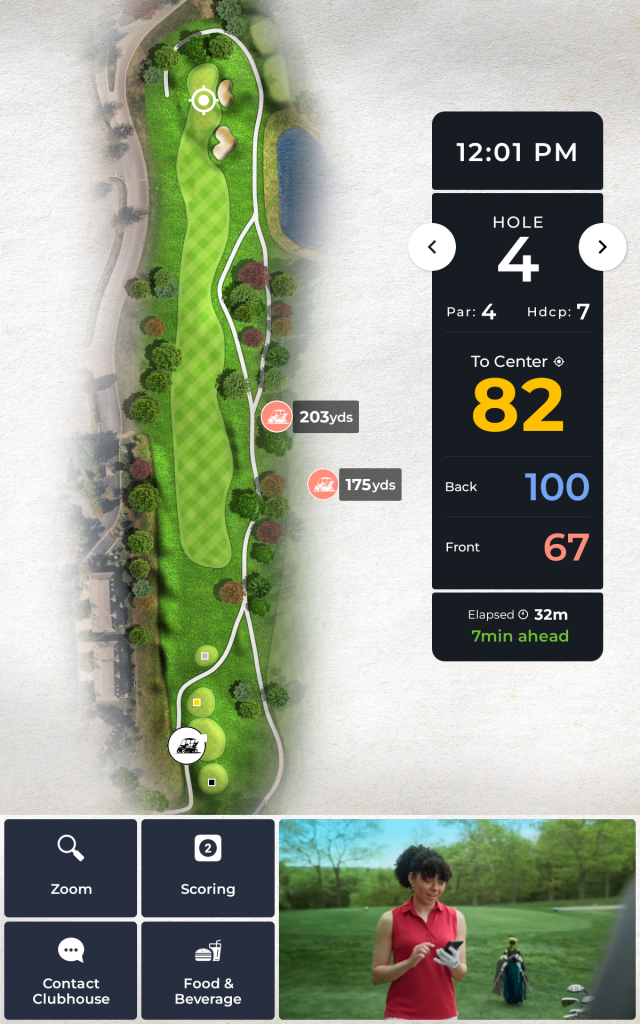
Expected Time vs Elapsed Time Displayed
The Golf GPS app can optionally display the “ahead” or “behind” pace in minutes. E.g. “5 min AHEAD”
By default, this value is currently set not to display. If you want to display the Expected vs Elapsed time value, please connect with your Reach Golfers Customer Success Manager.
Our customer success team will work with your team to review the hole-by-hole average play times based on the actual tee box geofences configured for your course layout before displaying this value to golfers.
It is important to note that due to the uniqueness of course layouts and circumstances where different holes share a cart path/parking area for both a green AND for the next hole’s tee box, the hole where the cart is parked for their time spent both on the putting green AND on the next tee will cause that putting hole to end ahead of the actual time the golfers leave the putting area, thus making that hole appear to play quicker than the tee box hole.
Precise Pin Placements
The control panel now allows users via mobile or desktop devices to set daily pin placements visually.
Pin Placements are managed in Control Panel/Course Management/Pin Placements page by selecting the hole, then siding the location marker to the specific location on the green to match today’s pin location. Then press SAVE.
How it works:
- Saved pin placements are valid for TODAY only
- TOMORROW, if new pin locations are not created, the GPS Screen will show Center of Green yardages
- Once pin placements are set for a day, carts on the course will see updated locations once they cross a tee box geofence

Look Ahead (Blind Shot Holes)
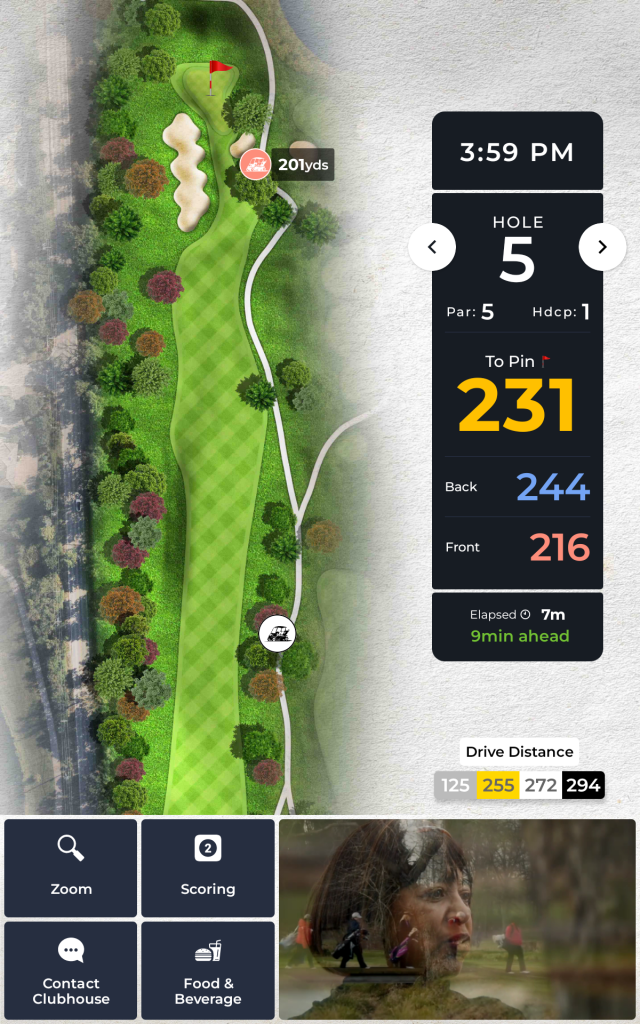
Look Ahead is designed to improve pace of play, on holes with long or blind shots the Look Ahead feature reveals the location and distance of other carts playing the hole – allowing players to make a more educated decision about when to play their next shot.
- Look Ahead cart locations update approximately every 5 seconds
- Look ahead is activated by default on any par 5 hole
Contact your Reach Golfers Customer Success manager to request additional holes at your facility to be enabled for Look Ahead
Example of the on-screen display on a Look Ahead enabled hole with other carts playing displayed:
Instant Message Delivery
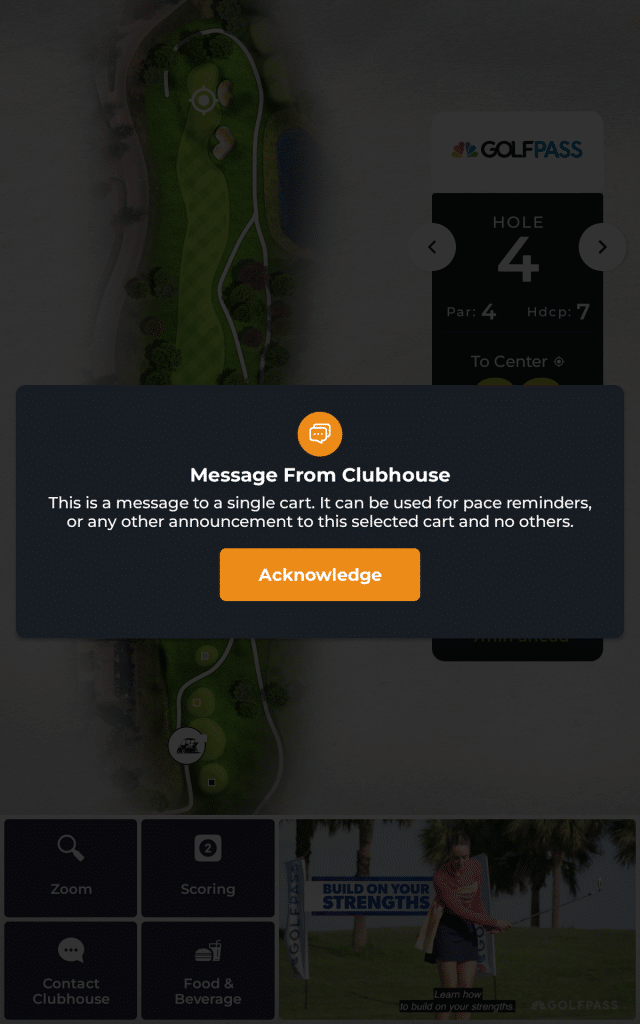
Messages (broadcast and single cart) sent from Control Panel to Carts now deliver in near real-time (seconds)
Single-Cart Alerts
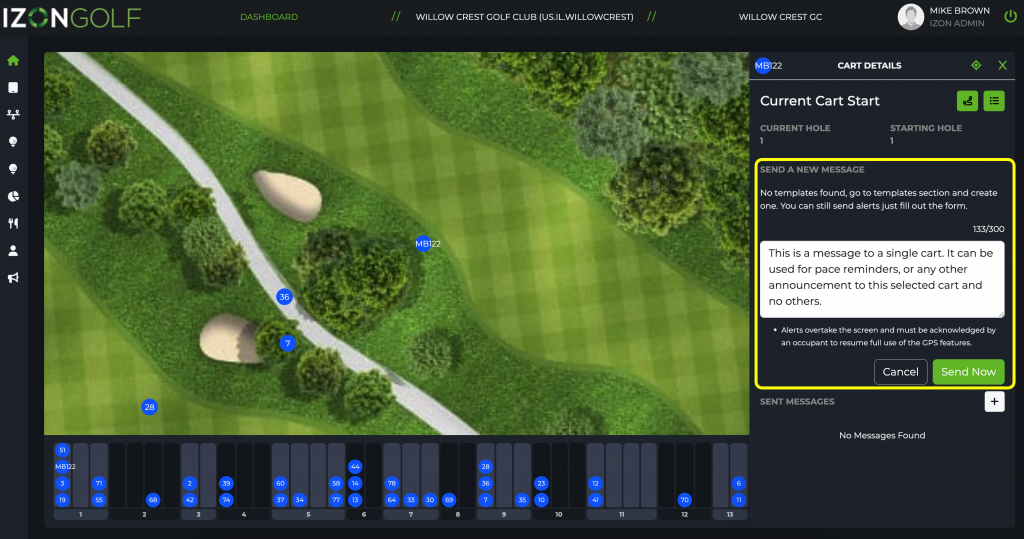
Selecting a single cart on the Dashboard Map allows Control Panel users to send a message to only that selected cart.
Example of user SENDING a single-cart message
Step 1 – select a cart on the map, in the list, or from the linear display bar. Choose the “+” button to send a new message.

Step 2 – type you message, or choose form a templated message, press “SEND”
Example of cart screen RECEIVING a message
Dark Mode Display On Golf GPS App Welcome Page
The Golf GPS app Welcome Page will now display in dark mode when not in a round. This is intended to improve visibility/safety to staff and golfer drivers in the very early morning and late evening times, when the sky is relatively dark. The dark mode reduces the brightness of the display, allowing for safer driving.
Dark Mode

Light Mode

Golf GPS v1.3.6
New Features
Expanded Geofence Options
A number of new geofence variants have been introduced to accommodate a wider array of options, including:
- Parking Lots
- Native Areas
- Road Crossings
- Wet Areas
- Ground Under Repair
- Custom Geofences
Custom geofences may be created by the ReachGolfers Customer Success team with any combination of variations of the following settings:
- Location (Hole vs Property)
- Sound Effect (4 options to choose)
- Sound Repeat (Yes/No)
- Heading
- Color
- Text (up to 50 chars)
- Body text (up to 300 char)
- Dismissibility Options (Yes/No)
- Timeout (seconds)
Original geofence types for Greens, Green Approach, and Cart Path Only are still available.
Backend Updates for Roadmap Items
New functionality is included to support future roadmap features, including:
- Roll-over detection and alerting, we will be tuning this feature over the next few weeks, it will be in the database if needed for any incidents
- Location update enhancements
Fixes & Improvements
Cart Path Only Status Fixes
We resolved a bug with our Cart Path Only settings. In some cases, the Cart Path Only status indicators in the Control Panel app were not aligned with the settings sent to the cart, causing confusion as carts on the course were still getting notifications even though CPO settings page displaying OFF in the Control Panel.
Clock Display in Local Time Zone
We fixed a bug when occasionally the screen was not recognizing the correct local time zone and displaying it incorrectly in the clock area during a round. To ensure we have accurate time appearing to the golfer, we have now built in logic to use the Time Zone of the club to define the time that is displayed to the golfer on the screen instead of relying on the devices local time.
Image Update LogicWe’ve improved the logic and resiliency for updating hole images automatically when new images are detected on the server.
Fixes & Improvements
Cart Path Only Status Fixes
We resolved a bug with our Cart Path Only settings. In some cases, the Cart Path Only status indicators in the Control Panel app were not aligned with the settings sent to the cart, causing confusion as carts on the course were still getting notifications even though CPO settings page displaying OFF in the Control Panel.
Clock Display in Local Time Zone
We fixed a bug when occasionally the screen was not recognizing the correct local time zone and displaying it incorrectly in the clock area during a round. To ensure we have accurate time appearing to the golfer, we have now built in logic to use the Time Zone of the club to define the time that is displayed to the golfer on the screen instead of relying on the devices local time.