Golf GPS v1.5.8
New Features
Cart Tagging
Tagging records is a common practice in modern software as a way to enhance data for reporting and analytical purposes. For example, tagging event carts, league carts, slow players, or players impacted by slow play can help you identify those groups and analyze data across time.
Tagging is managed on the Control Panel/Dashboard page, simply select a cart or multiple carts, and apply a tag. You have complete control over the tags to use, you create tags that a intended for permanent/long-term use, or just apply a tag for one-time use.
Tagged carts display in Dashboard views, and also in the Daily Cart Start reports, allowing you to export the data, or working with a technology partner and our API pull that data into your CRM or other marketing and analytical tools.
Automated, Integrated Tee Time Replay Offers
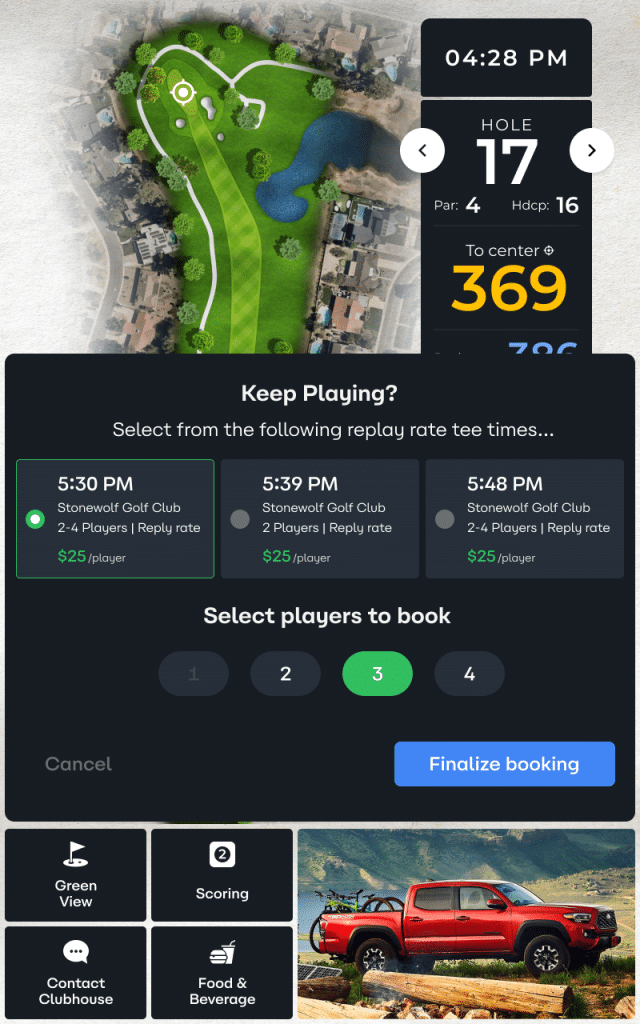
Automatically presents available tee times to golfers on the 17th hole, reducing friction and encouraging continued play.
Requires integration with your electronic tee sheet. Once enabled, the offer triggers automatically on hole 17, displaying real-time availability 30–90 minutes out. Golfers select a time, confirm the number of players, and the booking is made instantly on your tee sheet (example: “Cart 23 – GPS Replay Offer”). Replay rates, when available, are applied automatically.
Full Screen Alerts
At times, showing a full screen takeover can prove to be a powerful communication tool to connect with golfers in a round. These alerts are disruptive, and designed to accompany geofences that are not in the direct line of play. For instance on a drive from a green to the next tee box, or upon arriving at a tee box.
Precise Pin Placements
The control panel now allows users via mobile or desktop devices to set daily pin placements visually.
Pin Placements are managed in Control Panel/Course Management/Pin Placements page by selecting the hole, then siding the location marker to the specific location on the green to match today’s pin location. Then press SAVE.
How it works:
- Saved pin placements are valid for TODAY only
- TOMORROW, if new pin locations are not created, the GPS Screen will show Center of Green yardages
- Once pin placements are set for a day, carts on the course will see updated locations once they cross a tee box geofence

Look Ahead (Blind Shot Holes)
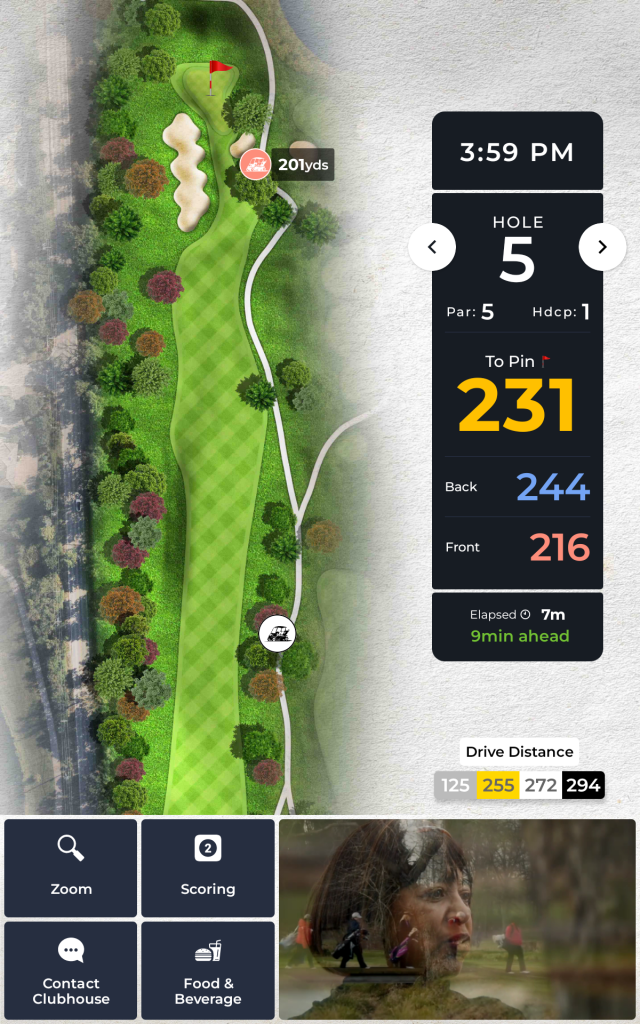
Look Ahead is designed to improve pace of play, on holes with long or blind shots the Look Ahead feature reveals the location and distance of other carts playing the hole – allowing players to make a more educated decision about when to play their next shot.
- Look Ahead cart locations update approximately every 5 seconds
- Look ahead is activated by default on any par 5 hole
Example of the on-screen display on a Look Ahead enabled hole with other carts playing displayed:
Instant Message Delivery
Messages (broadcast and single cart) sent from Control Panel to Carts now deliver in near real-time (seconds)
Single-Cart Alerts
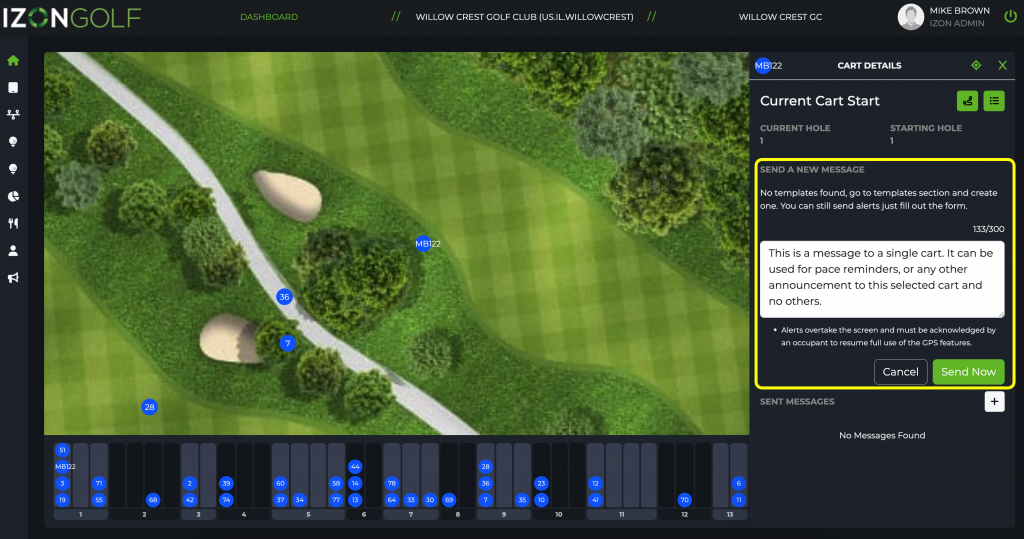
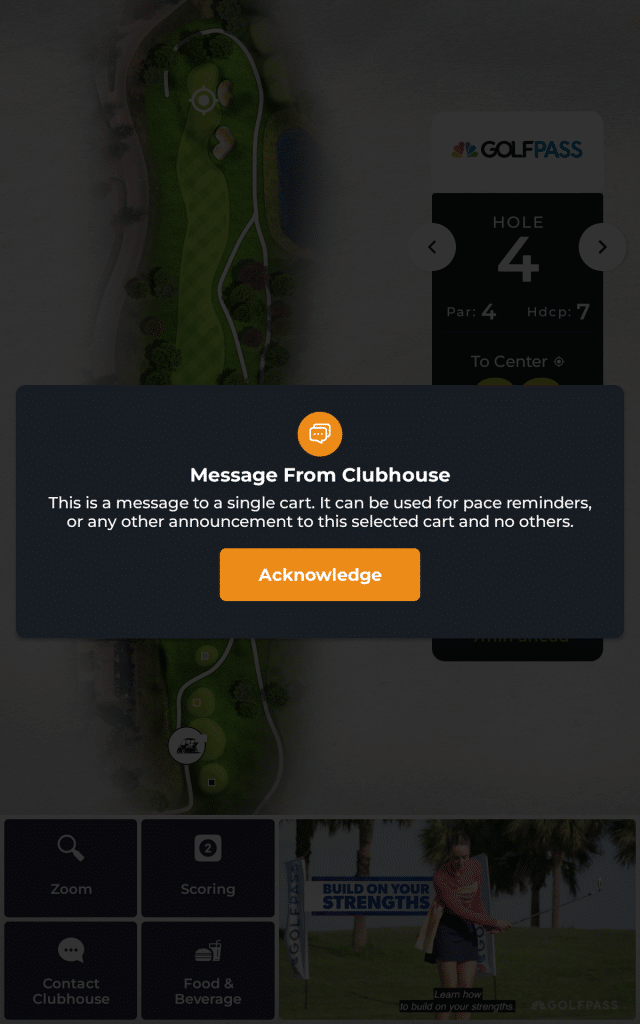
Selecting a single cart on the Dashboard Map allows Control Panel users to send a message to only that selected cart.
Example of user SENDING a single-cart message
Step 1 – select a cart on the map, in the list, or from the linear display bar. Choose the “+” button to send a new message.

Step 2 – type you message, or choose form a templated message, press “SEND”
Example of cart screen RECEIVING a message
Dark Mode Display On Golf GPS App Welcome Page
The Golf GPS app Welcome Page will now display in dark mode when not in a round. This is intended to improve visibility/safety to staff and golfer drivers in the very early morning and late evening times, when the sky is relatively dark. The dark mode reduces the brightness of the display, allowing for safer driving.
Dark Mode

Light Mode